

Consulting Offering
HSO's Agentic AI Advisory Service
Drive Real Business Outcomes with Agentic AI and Copilot Studio
Turn high-value use cases into enterprise-grade intelligent agents—securely, efficiently, and at scale.
View Agentic AI Services
Microsoft Copilot vs Copilot Studio + Cowork: Key Differences

The word "Copilot" appears everywhere in Microsoft's ecosystem, creating confusion about what you actually get with each product.
Microsoft offers two core enterprise tools: Copilot for Microsoft 365, the AI assistant your employees use daily, and Copilot Studio, the platform for building advanced custom AI agents. Newer tools like Copilot Cowork and Scout are now pushing Copilot from assisting to doing the work for you.
Here we will clarify what each product does, explain licensing requirements, and show how organizations combine these tools to deliver measurable business value.
M365 Copilot, Cowork and Copilot Studio Serve Different Purposes
Copilot for Microsoft 365 is the AI assistant that employees use. Copilot Studio is the platform to create, customize, and extend AI agents. Copilot Cowork is the delegated agent that takes an outcome and completes the work end to end.
All three products work together, but they solve different business needs. Copilot for M365 helps individuals work faster inside their everyday apps. Copilot Studio helps organizations automate processes and build specialized agents. Copilot Cowork goes a step further, planning and executing multi-step tasks across Outlook, Teams, Excel, and SharePoint, then checking in for approval once the work is done.
Product | Purpose | User Type | Data Grounding | Licensing Example | Example Tasks |
|---|---|---|---|---|---|
Copilot for Microsoft 365 | AI assistant for productivity | Information workers | Work IQ, Microsoft Graph (emails, files, meetings) | Per-user subscription | Summarize emails, draft documents, analyze data |
Copilot Studio | Platform to build custom agents | Developers, power users, IT | Connects to any data source via APIs | Consumption-based (Copilot Credits) | Automate approvals, create Q&A bots, integrate systems |
Copilot Cowork | Delegated agent for end-to-end task completion | Everyday workers handing off whole tasks | Runs across Outlook, Teams, Excel, and SharePoint | Microsoft 365 Copilot licence + Copilot Credits | Clean up a calendar, build a meeting deck, research a company |

What is Copilot for Microsoft 365?
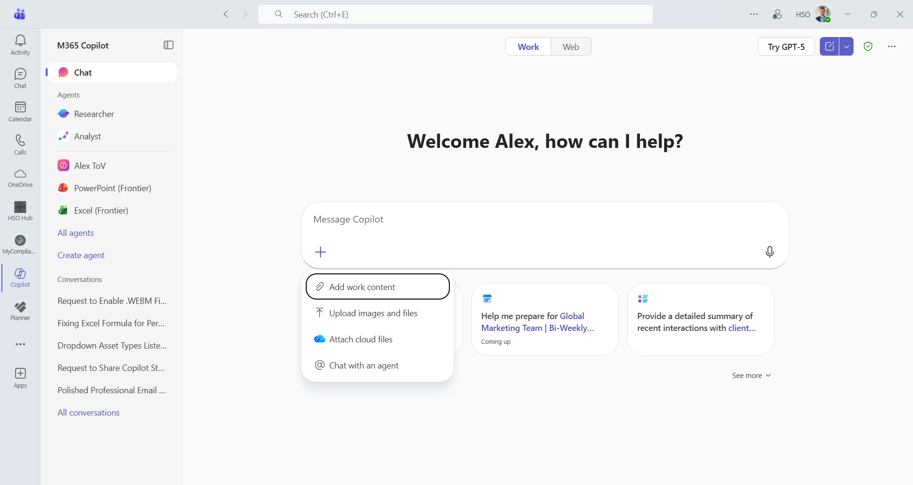
Copilot for Microsoft 365 is the AI assistant embedded in Word, Excel, Outlook, Teams, and other Microsoft apps. It is grounded by Work IQ, Microsoft's intelligence layer that connects your organization's emails, documents, meetings, and calendar data with memory of how you and your teams work. Work IQ builds on Microsoft Graph, but adds context and work patterns so responses are personalized rather than just searched.
This assistant helps information workers communicate, analyze, and create content faster. Typical tasks include:
Summarizing email threads and meeting transcripts
Generating first drafts of documents and presentations
Analyzing spreadsheet data and creating visualizations
Drafting responses and synthesizing information across apps
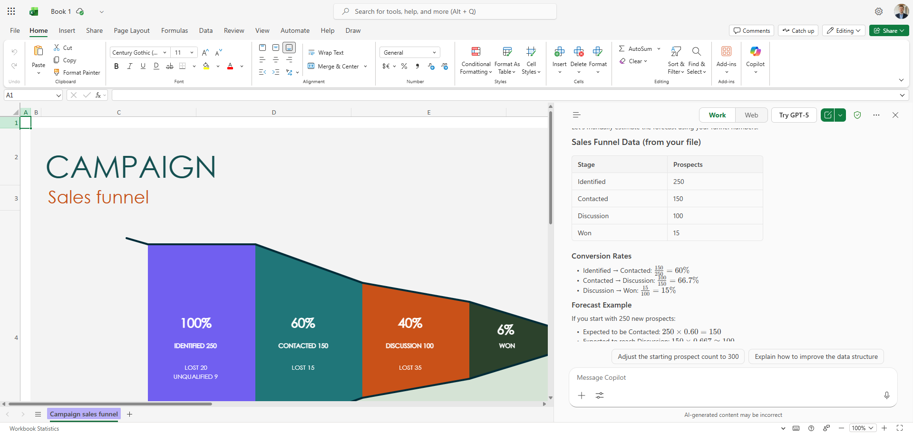
Copilot Chat provides a standalone chat interface where users ask questions and receive answers grounded in organizational data.
Copilot for Microsoft 365 is not designed for building advanced custom AI agents. You can create lite agents with instructions and knowledge, but complex workflows require Copilot Studio.
Note: Microsoft's AI Solutions also offer Copilot for individuals, a consumer product. This article focuses on business offerings only.
What is Copilot Studio?

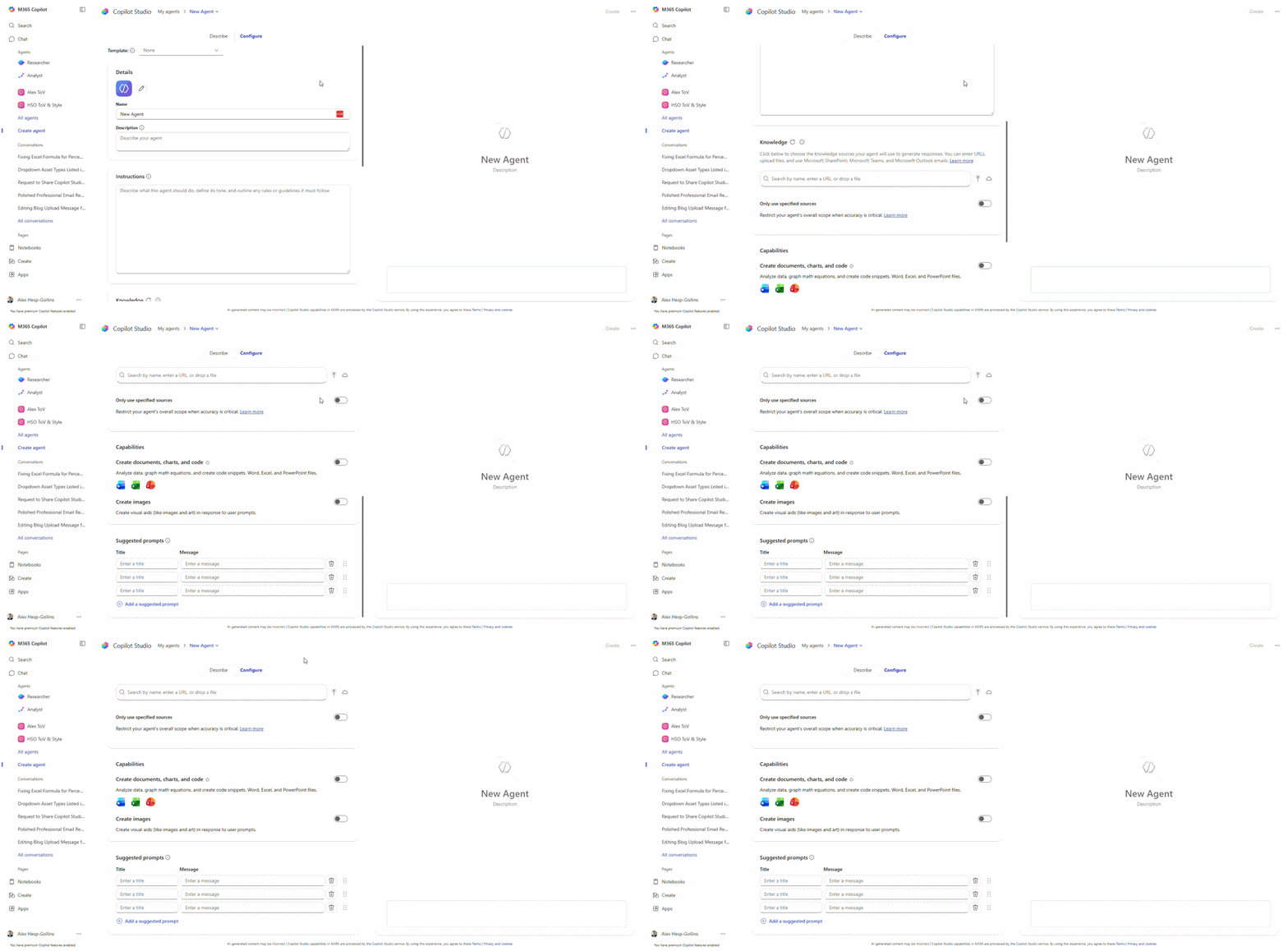
Copilot Studio is Microsoft's low-code platform for designing and managing advanced custom AI agents.
It connects to multiple data sources using connectors and APIs, enabling sophisticated workflows beyond what standard Copilot provides.
Organizations use Copilot Studio for enterprise-wide automation and specialized processes. The platform supports four agent types:
Q&A agents: Answer questions using knowledge bases and documentation
Workflow agents: Execute multi-step business processes with approvals
Autonomous agents: Monitor events and take action without human prompting
Cross-system agents: Integrate data from Dynamics 365, SAP, Salesforce, and custom systems
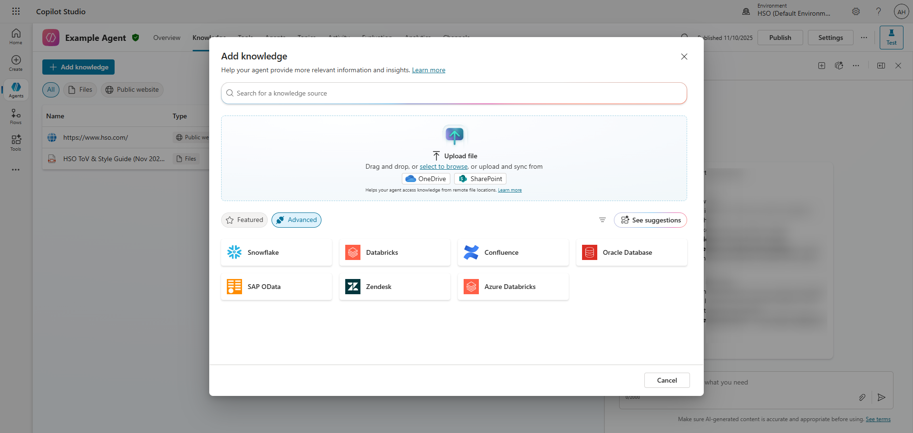
When you need Copilot Studio:
Your agents must access data outside Microsoft Graph
You require complex decision logic and branching workflows
You need integration with external systems like ERP or CRM
Your use case demands specialized automation beyond general productivity
Copilot Studio agents can now connect to Work IQ, the same intelligence layer that grounds Copilot for Microsoft 365. Work IQ MCP servers for Mail, Calendar, and Teams (currently in preview) give custom agents real-time context from emails, meetings, and chats without building those integrations yourself.
This narrows a historical gap between the two products. Studio agents previously needed connectors to reach Microsoft 365 data with anything close to Copilot's understanding of it. Note that agents using Work IQ MCP servers require a Microsoft 365 Copilot license, so organizations building these agents need both products.
Is Copilot Studio Included in Copilot for Microsoft 365?
Copilot for Microsoft 365 includes a so called "lite builder" experience inside the Copilot app. This allows users to create simple agents without purchasing a Copilot Credit pack subscription for studio.
Lite agents created in Copilot for Microsoft 365 support:

Standard Microsoft 365 Copilot license now includes full access to Copilot Studio features and all role-based Copilots, but advanced capabilities require prepaid Copilot subscription Credit packs or Pay-as-you-go:

Governance note: M365 admins control Copilot for Microsoft 365. Power Platform admins manage Copilot Studio environments, connectors, and data loss prevention policies.
You hit lite version limits when: Your agent needs data from systems outside Microsoft 365, requires approval workflows or multi step automation, needs detailed usage analytics beyond basic metrics, or your organization demands environment isolation for compliance.
Copilot Licensing Explained
Copilot for Microsoft 365 uses fixed per-user licensing. Copilot Studio uses consumption billing through Copilot Credits.
Organizations pay a monthly subscription per user. Prerequisites include Microsoft 365 E3, E5, Business Standard, or Business Premium.
Cost: $30 per user per month (as of May 2026)
Each license includes:
AI assistant access in all Microsoft 365 apps
Copilot Chat for standalone queries
Lite agent builder inside the Copilot app
For new customers include Microsoft 365 Business Basic and Microsoft 365 Copilot starting at $36.00 user/month, paid yearly.
Copilot Studio charges based on consumption measured in Copilot Credits. Authoring agents is free. Running agents consumes credits based on usage.
Cost: Organizations purchase capacity packs or pay-as-you-go.
Capacity Packs: Start at $200/month for 25,000 credits
Pay-as-you-go: This option allows organizations to link an Azure subscription and pay through metered, credit based billing with clear visibility into usage and cost. Billed at $0.01 per credit.
Pre-Purchase Plan (P3): A new annual upfront commitment option that allows organizations to buy Copilot Credit Commit Units (CCCUs) at a volume discount (savings ranging from 5% to 20%).
Credits cover agent conversations, API calls, and data operations. Complex agents with extensive integrations consume more credits than simple Q&A bots.
When you need capacity packs: Organizations deploying agents at scale benefit from predictable monthly costs rather than variable consumption charges.
Aspect | Copilot for M365 | Copilot Studio |
|---|---|---|
Licensing Model | Per-user subscription | Consumption-based credits |
Monthly Cost | $30/user | From $0.01 per credit |
What's Included | AI assistant in apps, lite agents | Full agent builder, connectors, analytics |
Prerequisites | M365 E3/E5 or Business Premium | Power Platform environment |
View the latest Microsoft pricing information.
Since late 2025, the standard Microsoft 365 Copilot license now includes full access to Copilot Studio features and all role-based Copilots (Copilot for Sales, Service, and Finance) at no extra cost for internal, licensed users.
The New E7 Tier: Microsoft 365 E7 became generally available on May 1, 2026 at $99 per user/month, bundling Microsoft 365 E5, Copilot, the Entra Suite, and Agent 365, Microsoft's new control plane for managing AI agents at scale.
Which One Do You Need?
Most organizations start with Copilot for Microsoft 365 and add Copilot Studio when specific automation needs emerge.
Use Copilot for Microsoft 365 or Cowork. Standard productivity gains (email summaries, document drafting, data analysis) do not require custom agents.
Start with lite agents in Copilot for Microsoft 365 or Cowork. If your agent only needs access to SharePoint documents and does not require workflow automation, lite agents handle this use case.
Upgrade to Copilot Studio when: You need integration with external knowledge bases, detailed analytics, or enterprise governance controls.
Use Copilot Studio. Agents that connect to Dynamics 365, SAP, Salesforce, or custom APIs require full Copilot Studio capabilities.
Choose Copilot for Microsoft 365 or Cowork if:
Your goal is individual productivity improvement
You need basic Q&A agents using Microsoft 365 data
You want to test AI assistant capabilities before larger investment
Choose Copilot Studio if:
You require integration with non-Microsoft systems
Your agents need complex workflows and approval processes
You demand enterprise governance and environment controls
You plan to deploy agents organization-wide
Choose both when: You want employees using AI assistants for daily work while specialized departments need custom automation.
"Microsoft 365 Copilot is your AI assistant, built around interactive prompts and conversations. Copilot Studio is the platform for building and deploying agents with different capabilities and integrations. Copilot Cowork is designed for delegation, planning and executing multi-step work on your behalf."

Real Examples: HSO's AI Agents Built with Copilot Studio
These production agents demonstrate what organizations achieve with Copilot Studio beyond standard Copilot capabilities.
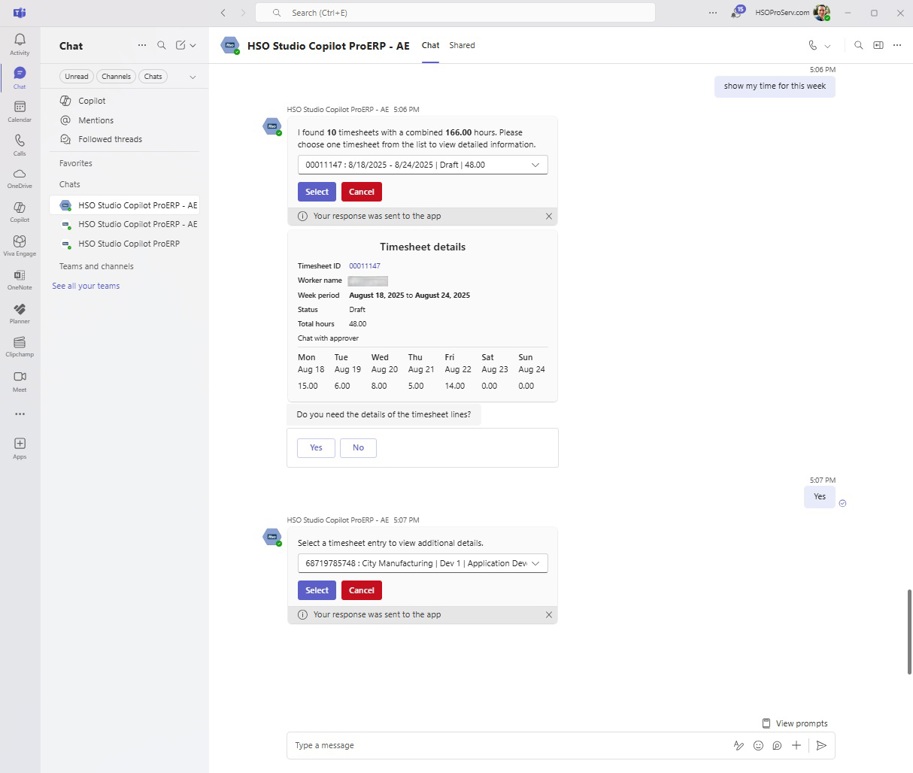
The Time Entry Agent eliminates timesheet friction by letting employees log hours through natural language commands all from within Microsoft Teams.
The agent integrates directly with Dynamics 365 Finance & Operations, ensuring accuracy and real-time synchronization. Employees type commands like "Add 6 hours Tuesday for Project Delta" instead of navigating complex forms.
Benefits:
Higher accuracy: Real-time Dynamics 365 sync eliminates manual errors
Reduced admin time: Smart automation copies from assignments and past weeks
Faster submissions: Conversational interface reduces manual entry time
Better adoption: Employees submit timesheets consistently without training
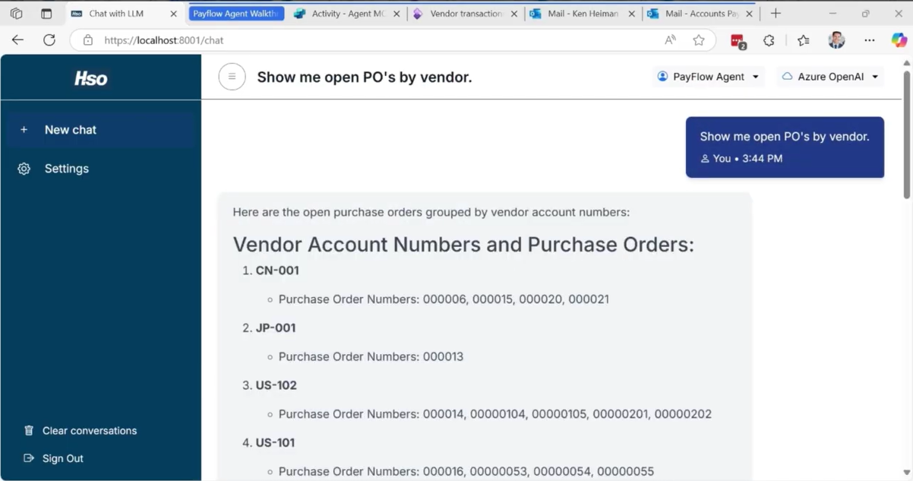
These agents solve specific business problems across functions:
Across HSO we are developing additional agents that address real enterprise challenges we see across our customer base, expanding the value organizations can unlock with Copilot Studio.
32% of surveyed organizations' data security incidents involve the use of GenAi tools
Governance and Enterprise Control
 Copilot governance requires coordination between M365 admins and Power Platform admins.
M365 admins control Copilot for Microsoft 365 access and basic agent creation. Power Platform admins manage Copilot Studio environments, connector permissions, and data loss prevention policies.
Essential governance controls:
What organizations must implement before scaling:
To scale AI agents responsibly, organizations should define a clear environment strategy that separates production, development, and testing.
They also need an approval process for connectors, enforce data loss prevention policies to block high risk connectors, document an agent lifecycle management approach, and ensure developers follow secure design patterns.
Copilot Cowork - The Next Evolution

Copilot Cowork takes an outcome and does the work for you, end to end. Announced by Microsoft in March 2026, Cowork marks the shift from Copilot answering questions to Copilot completing whole tasks on your behalf. As a frontier AI Microsoft partner, HSO has had early access to Cowork internally and has seen firsthand the way many knowledge workers operate and use Cowork.
The distinction is simple. Copilot helps you work. Studio helps you build. Cowork gets the work done.
Hand Cowork an outcome and it turns the request into a plan, runs in the background, checks in for your approval at the right moments, and returns finished deliverables. It stays grounded in your real Microsoft 365 signals through Work IQ, so the output reflects how you and your teams actually work.
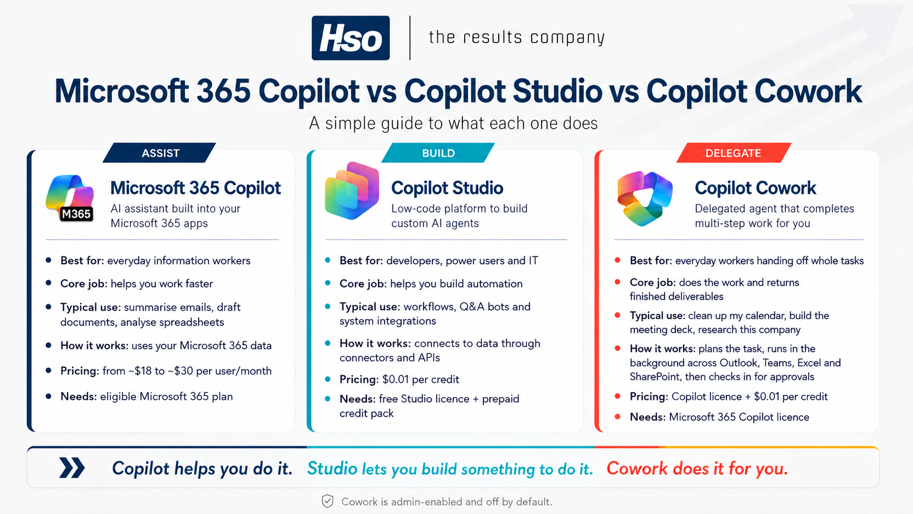
Clears the busywork: Clean up your calendar, triage a backlog, or chase a stalled thread.
Produces finished output: Build the meeting PowerPoint, draft the document, or pull together a research brief on a company.
Runs multi-step tasks: Break a request into steps and work across Outlook, Teams, Excel, and SharePoint without you stitching each app together.
Cowork plans the task, works autonomously in the background, and pauses for approval before anything sensitive is sent or shared. You stay in control of the outcome while it handles the steps in between. You also have the ability to create skills, which are detailed instructions on how the AI should perform and deliver the request in more granular detail as well as plugins which allow you to connect to other systems.
What you need
Cowork requires a Microsoft 365 Copilot licence, and it's admin-enabled and off by default. Administrators decide when to switch it on for your organization.
At present, Cowork is billed using Copilot credits ( $0.01 per credit). Here's the official documentation for up-to-date pricing information.
For organizations planning where delegated AI fits, HSO's Copilot consulting services help you scope the use cases worth handing off first.

Microsoft Scout is Microsoft's first "Autopilot," an always-on agent that works in the background and acts on your behalf. Introduced in June 2026, Scout goes a step beyond Cowork: where Cowork completes a task you hand it, Scout runs continuously and takes action without being prompted each time.
Scout lives across the Microsoft 365 apps you already use, connecting to Teams, Outlook, OneDrive, and SharePoint, and you interact with it inside Teams. It reduces day-to-day coordination by scheduling meetings across time zones, flagging important meetings, preparing the materials you need, blocking time for upcoming deliverables, and spotting risks like stalled decisions before they become blockers. Over time it builds context through Work IQ, and every agent operates under its own governed Entra identity so its actions are attributable and controlled.
Scout is an experimental release through the Frontier program, requiring Frontier enrollment, Intune policy configuration, and opt-in. Read Microsoft's introduction to Microsoft Scout for the full announcement.