
Why It Works
Expense Entry Agent by HSO delivers measurable results by automating one of the most tedious processes in employee operations. It’s fast, accurate, and built to scale with your business. The result? Less admin, more productivity.

Expense Entry Agent by HSO
Spend less time submitting expenses. More time driving results.
HSO Expense Entry Agent simplifies receipt capture and expense submission directly in Microsoft Teams. Employees upload a photo or receipt file, AI extracts the details, and the agent creates an expense line in the connected timesheet process, reducing repetitive entry and improving data quality.
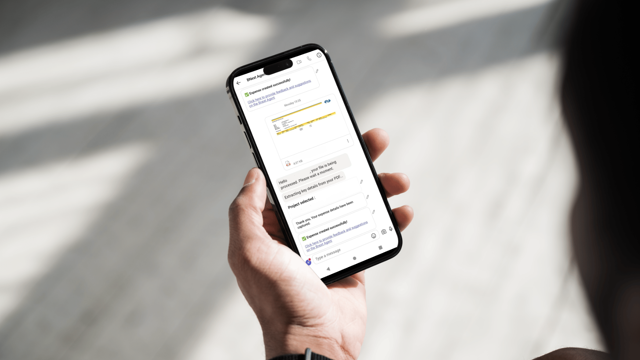
Smarter expense capture in the flow of work.
Expense Entry Agent brings receipt capture and expense submission into Microsoft Teams. Employees can upload receipts from mobile or desktop, while AI extracts key information and supports creation of expense lines in the existing timesheet process.
Built with Microsoft technology and shaped by HSO’s professional services experience, the agent helps organizations reduce administration and create a more consistent expense experience.

Move Beyond Manual Expense Reporting.
Expense reporting can interrupt productive work. Employees may photograph receipts, email files to themselves, re-enter information, and navigate disconnected tools. The result can be delays, lost receipts, inconsistent data, and additional administrative effort.
Expense Entry Agent changes the experience.
By simplifying capture and automating repeatable processing, the agent helps employees complete expenses with less friction while improving the quality and consistency of expense information.

The result? Delays, lost receipts, inconsistent data, and reduced productivity.
An average 3,000-person company processes over 70,000 expenses annually. That’s nearly 300 expenses per working day. Even small improvements in efficiency can result in significant time savings across the organization.
Even a 10% improvement can save hundreds of hours per month.

How the Expense Entry Agent Saves Time & Reduces Errors
• Submit receipts in seconds: Capture and upload receipts instantly by snapping a photo or upload a receipt file directly into the agent on Teams (mobile or desktop)
• AI handles the details: Automatically extract merchant, date, amount, and currency thanks to Azure OpenAI.
• Automated expense line creation: Receipts are converted into expense lines and added to your existing Timesheet system. All within Teams; no extra steps needed.
• Stay secure & compliant: Bring peace of mind to finance teams and executive leadership, with encrypted data, tracked access, and built-in compliance.
• Improve efficiency over time: Track usage, feedback, and costs to continuously optimize performance and reduce admin overhead.
Why It Works
Give employees more time for customers, projects, and higher-value activities while AI handles routine receipt processing.
Use HSO’s professional services and process expertise to improve an activity that affects productivity, project data, and financial administration.
Experience the Power of HSO's
Expense Entry Agent
See how HSO’s Expense Entry Agent streamlines your expense workflows. What could your team achieve with more accuracy and less admin?
Expense Entry Agent:
Used Daily by HSO Teams Around the World
At HSO we didn’t just build the Expense Entry Agent, we now use it daily across our global teams.

With services delivered to 60+ countries, HSO’s 3,000+ team members frequently travel to meet with our customers and Microsoft partners. As a result, our employees and admin teams manage a high volume of expenses across multiple countries, currencies, and languages—often with complex reimbursement rules and project mappings.
The Expense Entry Agent handles this complexity with ease. It learns from previous submissions, remembering project associations and auto-suggests the right context for each expense.
I used to block out at least an hour after every work trip just to process expenses. Now I just snap a photo on the spot, spend two minutes in Teams, and move on. No stress, and no pile of receipts I’m stressed about losing at the airport.
Book a Demo and learn how our Expense Entry Agent saves time and boosts accuracy.