
Why this AI workflow matters for investor relations teams
Action Where You Work:
AI Workflow Demos for Asset Management Teams
See how asset management teams can use AI agents and Copilot. Streamline investor relations and improve RFP workflows. Turn everyday conversations into governed CRM actions.

Asset management firms must move faster without losing control. Investor and client-facing teams must respond quickly, work with better context, and reduce manual effort. Too much of that work still depends on inboxes, spreadsheets, documents, and disconnected systems. Simultaneously, leadership needs stronger visibility, cleaner data, and more confidence that AI-supported workflows can operate within defined guardrails.
These demos show how AI workflow automation can support real work across asset management teams using Microsoft technology. They focus on practical workflows that support the way teams already work across Outlook, Teams, CRM, and other systems. Instead of adding disconnected AI tools, the demos show how firms can take a connected approach to investor communications, proposal support, and CRM activity while keeping people in control of the final outcome.
Explore AI Workflow Demos for Asset Management
These three demos highlight how asset management firms can apply AI to high-value workflows that often remain manual, fragmented, and difficult to track. Each example shows a different way to improve execution, strengthen consistency, and connect more activity back to governed systems of record.
DEMO: AI Workflow Demo for Investor Relations Inquiry Triage
Route, summarize, and track investor inquiries with greater speed and control
Investor relations teams are expected to respond quickly, route requests accurately, and maintain clear documentation. But many workflows still begin in shared inboxes, individual mailboxes, and manual handoffs—creating delays, inconsistency, and unnecessary effort.
This demo shows how to modernize investor relations inquiry triage using AI agents and Copilot within Microsoft tools. Rather than leaving Outlook or Teams to update another system, teams can manage requests where they already work. The workflow identifies relevant inquiries, provides summaries, recommends next steps, routes requests, and logs activity for improved tracking and auditability.

Triage investor inquiries faster
Manual inbox review slows response times and creates room for inconsistency. This workflow scans inbound messages, identifies relevant investor relations requests, flags urgency, and helps users act more quickly. It also ignores unrelated emails, reducing noise and helping teams focus on the work that matters.

Work in Outlook and Teams instead of switching tools
Investor relations teams should not have to jump between disconnected platforms just to process a request. This demo shows how triage can happen in the flow of work, with AI-generated summaries and action prompts appearing where users already spend their time.

Improve auditability and operational governance
Asset managers need inquiry handling that is not only fast, but also reviewable and trackable. This workflow routes requests using defined rules and service levels while automatically logging interactions in a tracking system for audit and compliance support.
What you’ll see in this investor relations AI demo
- Trigger an AI-powered workflow from an inbound IR email
- Identify whether the message is a true IR request
- Detect urgency and apply service levels
- Generate a Copilot summary for faster review
- Recommend the next best action
- Route requests to the right team or individual
- Store interactions for audit and tracking

DEMO: AI Workflow for RFP Knowledge Management in Asset Management
Streamline RFP response workflows and connect approved knowledge to CRM
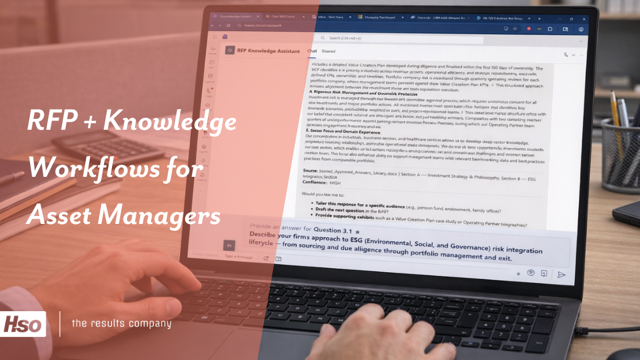
RFP and due diligence workflows remain one of the biggest sources of manual effort for asset managers. Teams often pull from scattered content, disconnected product information, prior responses, inboxes, and spreadsheets just to create a first draft. That slows response times, creates inconsistency, and makes it difficult to connect proposal activity back to the systems leaders rely on for visibility.
This demo shows how AI workflow automation can bring RFP knowledge workflows into a more connected process using Microsoft technology. Instead of treating proposal work as a separate activity outside CRM, AI agents and Copilot help teams work from approved content, relevant product data, and customer context while keeping humans in control.
Why this AI workflow matters for RFP and proposal teams
Respond faster without starting from scratch
RFP teams and distribution professionals spend too much time recreating answers that already exist across prior submissions, product content, and internal knowledge sources. This workflow helps reduce that effort by surfacing relevant approved information, organizing it into a usable draft, and giving teams a stronger starting point.

Connect proposal activity to CRM and client context
RFP work often lives outside the systems used to manage relationships, opportunities, and account intelligence. Connecting these workflows back to CRM gives firms better visibility into what teams are requesting, which relationships are active, and how proposal activity supports sales and distribution efforts.
Support review, governance, and auditability
AI in asset management must operate within clear guardrails. This workflow supports human review, approved content usage, and stronger traceability across the response process. That helps firms improve efficiency without sacrificing control, consistency, or internal compliance expectations.
What you’ll see in this RFP AI demo
- Use approved content and business context to support RFP workflows
- Reduce manual searching and drafting
- Connect proposal activity back to CRM
- Support governance with human review
- Move from fragmented workflow to more intelligent action
- Route requests to the right team or individual
- Store interactions for audit and tracking
DEMO: AI Workflow for Chat-to-CRM in Asset Management
Turn conversations, meeting notes, and follow-up requests into governed CRM action
Distribution and client teams at asset management firms do not work in one system. They move between Outlook, Teams, calendars, documents, notes, and CRM, often updating key information after the fact, if it gets updated at all. That creates lag, inconsistency, and missed context.
This demo shows how chat-to-CRM workflows help asset managers turn natural language into structured action. A user can ask for meeting prep, request a follow-up email, capture notes after a client conversation, or update CRM records in plain language. The agent pulls from relevant business systems, presents recommendations, and keeps a human in the loop before anything is finalized.
Why this AI workflow matters for distribution and client teams

Prepare for meetings with better relationship context
Investor relations teams must respond quickly and maintain documentation, yet many workflows rely on shared inboxes and manual handoffs—causing delays and inconsistency. Teams can modernize inquiry triage with AI agents and Copilot--managing requests in Outlook or Teams while the workflow summarizes, routes, and logs activity for better tracking and auditability.

Turn follow-up into action without added admin
After a client conversation, the real work begins. Users can ask the agent to draft a follow-up email, schedule next steps, or log meeting notes into CRM without rekeying details across systems. Instead of relying on delayed manual entry, teams can capture momentum immediately while preserving human review and control.

Improve CRM quality without forcing new behavior
Asset managers often struggle because the real workflow lives in inboxes, chats, and spreadsheets instead of CRM. This approach lets users work in familiar tools while still updating governed systems of record behind the scenes. That supports stronger adoption, cleaner data, and better visibility for leadership.
What you’ll see in this Chat-to-CRM AI demo
- Prepare for meetings with context from Outlook, Teams, calendars, documents, and CRM
- Surface contacts, opportunity details, and next steps
- Draft follow-up emails in natural language
- Turn meeting notes into structured CRM updates
- Keep human review in place before submission



Why AI Workflow Automation Matters for Asset Management Teams
From Use Case to AI Agent—In Less Than a Day
Asset managers do not need more disconnected AI experiments. They need practical workflows that help teams move faster, improve consistency, and work within the systems and existing controls.
If you think one of these agents would be a good fit for your firm, let's get started. Select the complimentary workshop that matches your stage.
Learn more about how we support Asset Management firms
Learn More
Ready to explore what this could look like for your team? Start the conversation with our experts.