Consulting Offering
HSO's Suite of Microsoft Fabric Offerings
Pave the way for informed decision making with a comprehensive suite of tools that accelerate your Fabric journey
Find Out How

Microsoft Fabric vs Power BI: Real Business Differences Compared

Most teams think Power BI and Microsoft Fabric are competing tools, but the real surprise is how differently they work behind the scenes.
Fabric is the engine room that powers the entire data analytics lifecycle, while Power BI remains the familiar window where insights come to life.
In this article you'll see how they compare side by side, where each one fits in your data strategy, and how to decide what your organization actually needs.
Microsoft Fabric vs Power BI Overview
Microsoft Fabric is a unified, end-to-end data platform. Power BI is the analytics and visualization layer that now lives inside it.
What Fabric adds:
Unified storage through OneLake
Data engineering with Synapse
Real-time analytics with Synapse and automated actions with Data Activator
Data science workloads
Enterprise governance across your data estate
What stays the same: Your Power BI reports, dashboards, and semantic models remain unchanged.

For CIOs and data leaders, this matters because Fabric addresses three challenges Power BI alone cannot solve: scalability across growing data volumes, governance spanning pipelines and models, and AI readiness requiring unified data foundations.
Aspect | Microsoft Fabric | Power BI |
|---|---|---|
Purpose | End-to-end data platform covering ingestion, storage, engineering, science, real-time analytics, and BI | Business intelligence and data visualization solution |
Architecture | OneLake unified storage with lakehouse architecture | Semantic models with import, DirectQuery, or composite modes |
Target Users | Data engineers, architects, data scientists, analysts, business users | Business analysts, report creators, decision makers |
Scope | Full data lifecycle from raw ingestion to insight delivery | Analytics and reporting layer |
Governance | Centralized governance across all workloads using Microsoft Purview | Report-level and dataset-level security and governance |
Licensing Model | Capacity-based pricing measured in Fabric Capacity Units (FCUs) | Per-user licensing (Pro, Premium Per User) or capacity-based (Premium) |
AI Integration | Deep integration with Azure AI, Synapse Data Science, Copilot across workloads | Copilot in Power BI, AI visuals, Q&A natural language queries |
Workloads Included | Data Engineering, Data Warehouse, Data Science, Real-Time Analytics, Data Factory, Power BI | Power BI Desktop, Power BI Service, Power BI Mobile |
What is Microsoft Fabric?
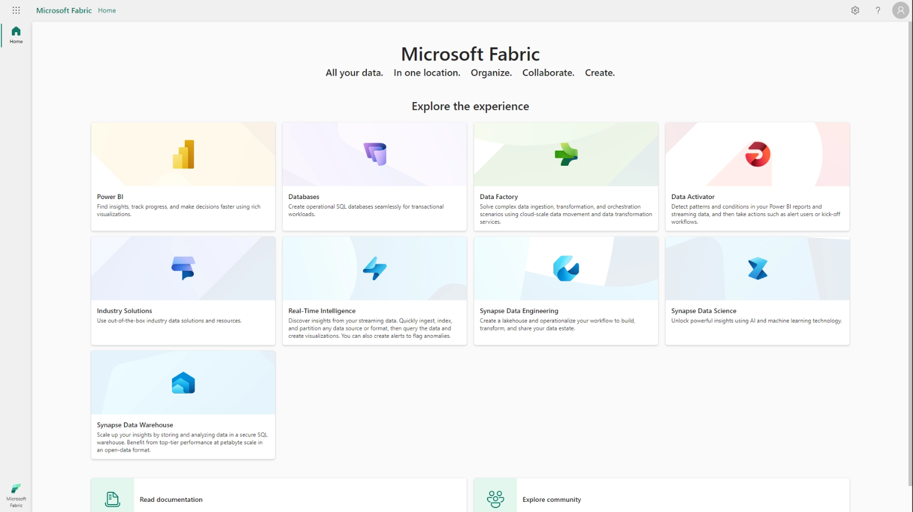
Microsoft Fabric is Microsoft's SaaS data and analytics platform that unifies data ingestion, storage, engineering, real-time processing, data science, and business intelligence into a single experience. Organizations use Fabric to eliminate data silos, standardize governance, and accelerate the path from raw data to AI-powered insights.
Fabric includes core workloads that work together seamlessly. Data Engineering provides Spark-based notebooks and lakehouses for transforming large-scale data. Data Factory orchestrates data movement and ETL pipelines. Data Warehouse delivers enterprise SQL analytics with automatic optimization.
Data Science enables machine learning model development and deployment. Real-Time Analytics processes streaming data through event streams and KQL databases. Data Activator automates responses to data events and triggers alerts based on real-time conditions. Power BI serves as the reporting and visualization layer that connects to all other workloads.
View the Microsoft Fabric Guided Tour
The platform centers on three design goals:
First, delivering a single SaaS experience where users access all capabilities through one portal without managing infrastructure.
Second, OneLake provides unified storage in an open Delta Lake format, allowing different teams to work with the same data using their preferred tools.
Third, shared governance and security policies apply across all workloads through Microsoft Purview integration, reducing the complexity of managing permissions and compliance requirements separately for each component.
What is Power BI?
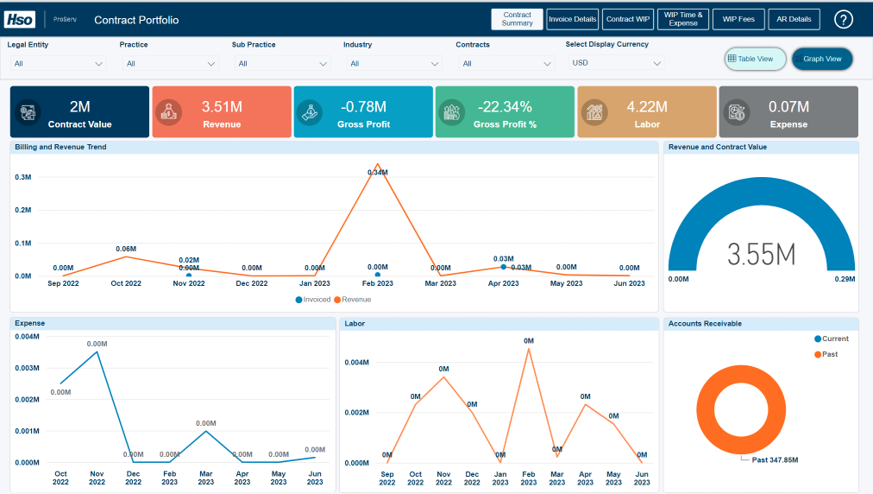
Power BI is Microsoft's business intelligence and data visualization solution that transforms data into interactive reports and dashboards. Organizations use Power BI to connect to hundreds of data sources, model relationships, and share insights across teams through web and mobile experiences.
Power BI Desktop provides the Windows application where report creators build data models and design visualizations. Power BI Service offers the cloud platform for publishing, sharing, and collaborating on reports. Power Query enables data transformation and preparation. DAX serves as the formula language for creating calculated columns and measures. Power BI Mobile delivers optimized viewing experiences on phones and tablets. Paginated Reports support pixel-perfect, printable documents for operational reporting needs.
Power BI operates as both a standalone product and a core workload within Microsoft Fabric. Organizations can use Power BI independently by connecting to existing data warehouses, databases, or files. When used within Fabric, Power BI gains access to OneLake storage and benefits from unified governance, but the user experience for creating and consuming reports remains consistent whether working standalone or integrated with Fabric's broader platform.
How Microsoft Fabric and Power BI Fit Together
Microsoft Fabric functions as the full-stack data platform while Power BI serves as the user-facing analytics experience. Power BI handles what business users see while Fabric manages everything that happens before data reaches those reports.
How they connect:
OneLake provides shared storage both platforms access
Data engineers build pipelines in Fabric that automatically become available to Power BI
Direct Lake mode eliminates choosing between importing data or real-time queries
Power BI reads directly from OneLake's Delta tables without copying or caching

Three tangible benefits:
Single source of truth: All teams work from the same OneLake data rather than creating duplicate copies
Shared governance: Security policies, sensitivity labels, and compliance rules apply consistently from raw data through final reports
AI readiness: Unified platform ensures high-quality data flows seamlessly to machine learning models and generative AI applications
View all of Microsoft's business intelligence tools.
Fabric covers the complete data stack from ingestion through insight delivery.
Power BI specializes in the analytics layer where prepared data transforms into visual insights.

Fabric uses OneLake as its unified storage layer, storing data in open Delta Lake format.
Power BI builds semantic models on top of that storage, enabling fast queries through Direct Lake mode while maintaining the familiar modeling experience analysts expect.
Data engineers who build pipelines
Architects who design data platforms
Data scientists who develop predictive models
Analysts who create reports
Business users who consume insights through dashboards
Fabric provides centralized governance across all data workloads through Microsoft Purview integration.
Security policies, data lineage tracking, sensitivity labels, and compliance frameworks apply uniformly from raw data landing zones through published reports. This eliminates the gap that occurs when governance stops at the data warehouse boundary and reports operate under separate security models.

Power BI uses per-user licensing for most scenarios. Microsoft Fabric operates on a capacity-based model measured in Fabric Capacity Units (FCUs).
Power BI Pro: $14 per user per month for report creation, sharing, and collaboration
Power BI Premium Per User: $24 per user per month with advanced features
Power BI Premium Per Capacity: Power BI Premium per-capacity (P-SKUs) has been retired. New capacity is purchased as Microsoft Fabric (F-SKUs), and existing Premium customers transition to a Fabric capacity at their next renewal
Feature | Power BI Pro | Power BI Premium Per User (PPU) | Power BI Premium Per Capacity |
|---|---|---|---|
Target Audience | Individuals/small teams | Data professionals with enterprise needs | Large organizations/enterprises |
Price (per month) | $14/user (as of April 2025) | $24/user (as of April 2025) | Starts at ~$4,995/capacity |
Content Consumers | Must have Pro license | Must have PPU license | Can use free licenses |
Model Size Limit | 1 GB | 100 GB | 400 GB |
Storage | 10 GB/user | 100 TB | 100 TB |
Capacity-based model measured in Fabric Capacity Units (FCUs)
Entry SKU (F2): $262 per month with 2 FCUs (or $0.36 per hour)
Enterprise SKUs scale up to F2048, with F64 (64 CUs) the common entry point for organization-wide deployment.
Includes all workloads: Data Engineering, Data Warehouse, Data Science, Real-Time Analytics, Data Factory, and Power BI
Pay-as-you-go consumption within capacity pool
Organizations with existing Power BI Premium capacity can convert at equivalent performance levels
*All pricing is subject to change - Pricing data correct at the time of writing
Fabric is much more than just a set of tools and services; it is a platform for change.

Real World Business Scenarios
A manufacturing organization starts with departments building ad hoc reports in Power BI. Sales pulls CRM exports into Excel, operations connects directly to production databases, and finance maintains separate weekly data extracts.
Each department creates metrics independently, resulting in three different definitions of "customer lifetime value."
Common challenges:
Reports break when source spreadsheets move
DirectQuery performance degrades as more users query simultaneously
Weekly refresh schedules cannot meet demand for current data
Business leaders receive conflicting numbers across departments
How Fabric helps:
Consolidates raw data into OneLake through Data Factory pipelines
Data engineers build transformation logic in lakehouse notebooks
Centralized data warehouse provides consistent dimensions and facts
Governed datasets replace individual Power BI imports
Results:
Metrics match across all reports
Data duplication eliminated
Refresh performance improves through incremental pipelines
Clear handoff between data engineering and BI teams
View Power BI vs Excel comparison.
A financial services firm relies on a 15-year-old on-premise SQL Server data warehouse. Power BI connects through gateway servers, but development cycles for new data sources take months.
The warehouse cannot handle real-time data streams from digital banking platforms.
Key issues:
Slow development cycles prevent responding to competitive threats
Siloed data sources never integrate digital and traditional banking data
Scaling requires expensive hardware upgrades
AI initiatives stall due to data quality and governance gaps
Fabric migration approach:
Phase 1: Land raw data in OneLake while existing warehouse continues serving current reports
Phase 2: Rebuild warehouse logic incrementally in Fabric's data warehouse or lakehouse layers
Phase 3: Deploy new capabilities - real-time streams, machine learning models, operational monitoring
Benefits for Power BI users:
Minimal disruption as reports continue working throughout migration
Report creators switch to Direct Lake mode for performance improvements
Modernized backend supports streaming analytics, predictive modeling, and AI applications
Familiar Power BI interface remains consistent
"More than 28,000 customers—including 80% of the Fortune 500—now rely on Microsoft Fabric."
AI Readiness
AI readiness requires more than connectivity to machine learning platforms. Successful AI implementations depend on unified, high-quality data that flows through governed pipelines.
Fabric addresses this through OneLake's single storage layer where data engineers, data scientists, and analysts access the same datasets without creating duplicate copies. Data quality rules enforced during ingestion ensure consistency. Semantic models provide business context that improves AI accuracy.

The result is shorter time-to-value for AI projects because teams spend less time reconciling data and more time building models that solve business problems.
Microsoft has introduced Microsoft Fabric IQ, an advanced semantic intelligence layer that elevates Fabric from a unified data platform into a unified intelligence platform.
Fabric IQ builds on the existing Fabric foundation by enabling teams and AI agents to understand, reason, and act using shared business meaning rather than raw data.

Fabric IQ introduces five core capabilities:
Ontology: A no-code semantic model that captures business entities, relationships, rules, and actions.
Semantic Model Expansion: Power BI semantic definitions extend into operational decisioning, not just reporting.
Graph Engine: Enables multi-hop reasoning across connected data, domains, and systems.
Data Agents: Virtual analysts that answer business questions using structured business context.
Operations Agents: Autonomous agents that evaluate real-time conditions and take governed, objective-aligned actions.
How to Decide Your Next Step
Organizations face different starting points and different constraints when evaluating Power BI and Fabric. The right decision depends on current data complexity, team capabilities, and strategic priorities rather than universal best practices.
Start with Power BI if your data sources fit within Power BI's 1GB semantic model limit for Pro licensing or your models (up to 400GB) are already hosted in Power BI Premium, your data warehouse or database already consolidates enterprise data, your primary need focuses on visualization and self-service reporting, your organization operates with fewer than 50 regular report creators, and you need fast deployment without extensive data engineering work.
Move to Fabric when data volumes exceed comfortable Power BI limits or refresh windows extend beyond acceptable timeframes, multiple teams duplicate ETL logic because no shared transformation layer exists, real-time analytics requirements emerge that batch-based Power BI refreshes cannot satisfy, machine learning initiatives need governed access to operational data, compliance requirements demand lineage tracking across the complete data lifecycle, or siloed data platforms create integration complexity that slows analytics delivery.
Take a hybrid approach by continuing to use Power BI for current reporting needs while adopting individual Fabric workloads that address specific gaps. Organizations might implement Data Factory to consolidate pipeline logic, add Real-Time Analytics for operational monitoring, or deploy Data Science capabilities for predictive modeling. Power BI reports continue working unchanged while backend capabilities expand incrementally. This phased adoption reduces risk and allows teams to build expertise gradually rather than attempting full platform migration simultaneously.
Decision framework dimensions:
Moving from standalone Power BI to Microsoft Fabric represents a significant infrastructure decision. The right approach balances ambition with pragmatism, starting with workloads that deliver measurable value while building capabilities for broader adoption.
The Microsoft Fabric Jumpstart provides a structured entry point for organizations evaluating Fabric. This four-day workshop brings together your technical teams and HSO's Fabric experts to co-develop your first Fabric workload. Or view our related:
Our consultants bring deep technical expertise combined with industry knowledge across financial services, manufacturing, retail, and professional services. We help you determine when Fabric adds strategic capability and when focused Power BI improvements better serve immediate needs.